


Liveguard AI Motion Detection


Intrusion Zones or Line Crossings
Intrusion Zones or Line Crossings
Rather than the traditional motion detection boxes, we can use line crossings and intrusion zones increasing the accuracy of the event. Learn more below.

Min and Max Sized Objects
You can draw the minimum and maximum sized object that you will want the camera to pick up as an event. This prevents moths, birds and pets from triggering the events.

Detection Targets
Hikvision's impressive AI can recognise human and vehicles as a detection target giving you alerts.

What are AI Smart Events?
This is an example of a standard Motion Detection grid.
When we set up your new cameras we can select the part of the recorded image that we would like to detect motion. Any part of the image with a Red Square will be a trigger for the camera to record the full image. So in this example, it might be wise to remove the Red squares from the road or else you'll record every car that passes.
But what if you want to do more? Lets explore the types of Smart events you can create with a Hikvision Camera
Are Motion Detection Events filling up your CCTV recorder?
Motion Detection events are the most common way to trigger a security camera to record. This is the main alternative to recording conitunously as it will extend the recording during of any cctv installation. When enabled, Motion Detection detects moving objects in the configured surveillance area and triggers certain actions, like a recording, as a response to a detection. In the screen capture taken on the security camera, we can see that the grid is covering the entire picture. This means that the whole scene is constantly being observed for motion detection. Upon motion Detection the camera can trigger different types of alarms and notifications to bring attention to those areas. The main issue with this type of event is at night, when moths etc trigger numerous false activations.
Hikvision cameras are advanced cameras that feature a robust set of Smart Events to help secure your property better. These Analytics Events are easy to configure and have revolutionised traditional surveillance systems. Unlike Motion Detection, smart events are far more precise and occur less often.
This enables you to set them up to trigger instant push notification to your mobile devices.
Here’s a list of Hikvision Smart Events.
Motion Detection Grid
Line Crossing Detection

Hikvision Line Crossing
Detects people, vehicle or other objects which cross a pre-defined virtual line, and some certain actions can be taken when the alarm is triggered. In this configuration picture, we can see that an event is triggered when an object crosses the line in either direction. On current Hikvision Cameras, you can set up to 4 different line crossing events. It is also possible to configure the line crossing to only trigger when a car is exiting the driveway or just when a car is entering.
Object Removal Detection

Hikvision Object Removal
Detects objects removed from the pre-defined region, such as the exhibits on display, and a series of actions can be taken when the alarm is triggered. In this picture, we are watching the parked car. When the car is removed from the area being watched an event will be triggered. You can set up to four object Removal events on most Hikvision Camera models.
Intrusion Detection

Hikvision Intrusion Detection
Detects people, vehicle or other objects which enter and loiter in a pre-defined virtual region, and some certain actions can be taken when the alarm is triggered. When configuring this event, you can set the duration of time an object must be in the region to consider it an intrusion detection. You can configure to 4 different areas for intrusion detection on this camera.
Region Entrance Detection
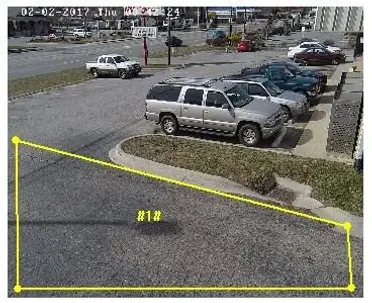
Hikvision Region Entrance
Detects people, vehicle or other objects which enter a pre-defined virtual area from the outside place, and some certain actions can be taken when the alarm is triggered. Unlike intrusion detection region entrance detection fires an event as soon as the area is encroached upon. You can set up to 4 Region entrance detections on the Hikvision 4k camera.
Region Exit Detection

Hikvision Region Exiting
Detects people, vehicle or other objects which exit from a pre-defined virtual region, and some certain actions can be taken when the alarm is triggered. In this case, we can see that region exiting is set up on the parking spots. When an object leaves this area after being here for a while, an event is triggered, and the issue can be addressed. New Hikvision cameras can support up to 4 Region Exiting Detection areas.
Unattended Baggage Detection
